

Powered by: Tech2
Last Updated: May 18, 2026, 12:00 IST
In an era where digital privacy has transitioned from a niche concern to a global imperative, our smartphones stand as critical interfaces to our personal and professional lives. With every tap, swipe, and voice command, we entrust these devices with an unprecedented volume of sensitive data. Recognizing this profound responsibility, technology giants have increasingly focused on empowering users with greater transparency and control over their digital footprint. Among these efforts, Apple’s distinctive green and orange privacy indicators have emerged as simple yet profoundly impactful safeguards, offering real-time visual alerts whenever an app accesses the device’s camera or microphone.
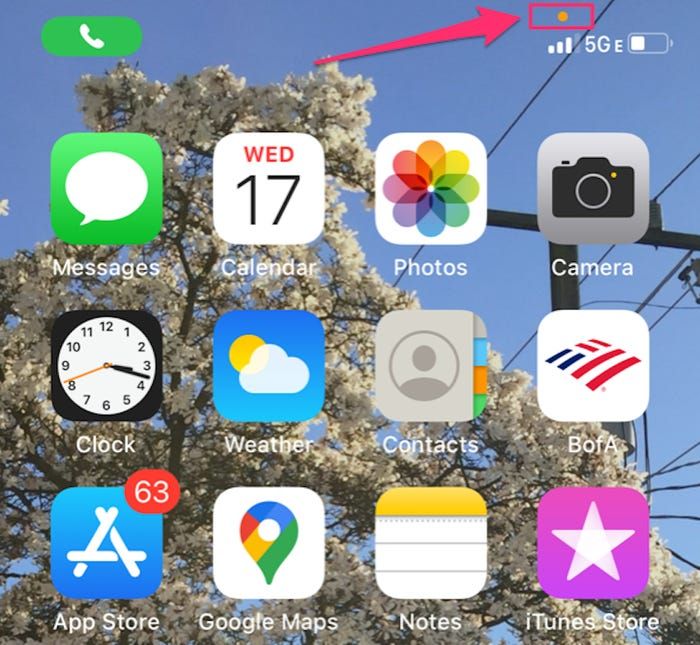
These unassuming coloured dots, appearing subtly in the top corner of an iPhone screen, are far more than mere aesthetic elements; they are vital privacy sentinels, designed to demystify the background operations of applications and provide users with immediate awareness. Often noticed but rarely fully understood, these indicators represent a cornerstone of Apple’s comprehensive privacy architecture, serving as an unambiguous signal that your device is either capturing visual information or actively listening. In a world where the line between convenience and intrusion can blur, understanding the meaning and significance of these dots is paramount for every iPhone user navigating the complexities of modern digital life.
The Core Revelation: What the Dots Truly Signify
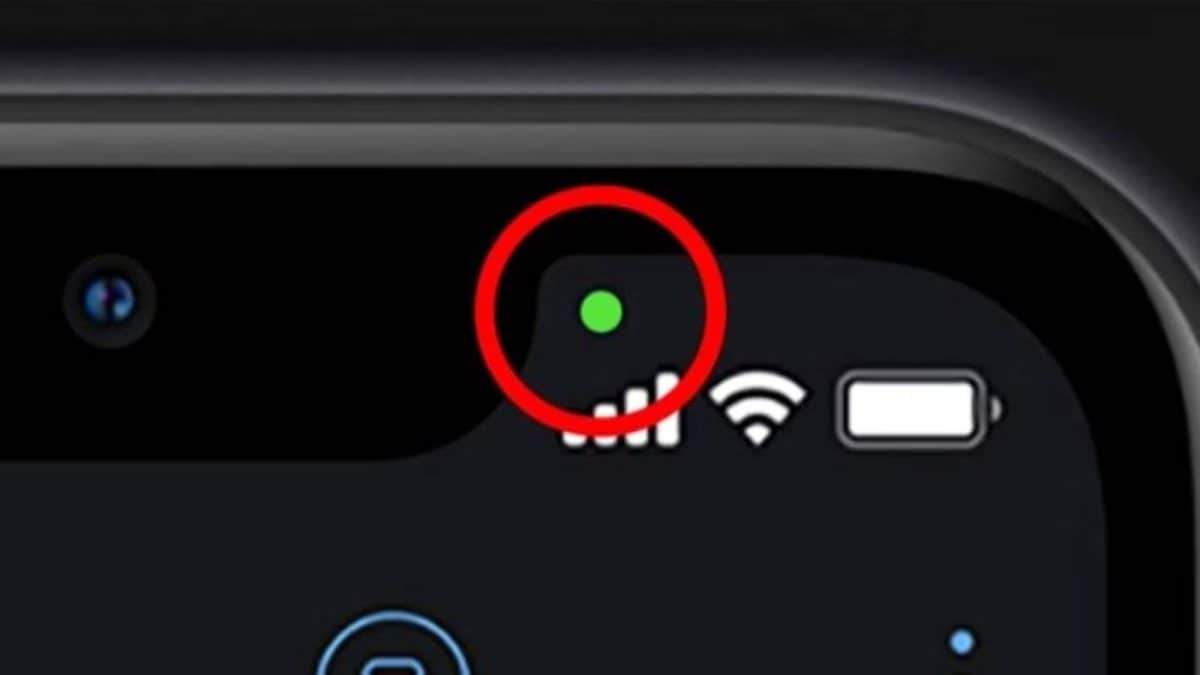
At the heart of Apple’s privacy commitment lies the straightforward interpretation of these indicators:
-
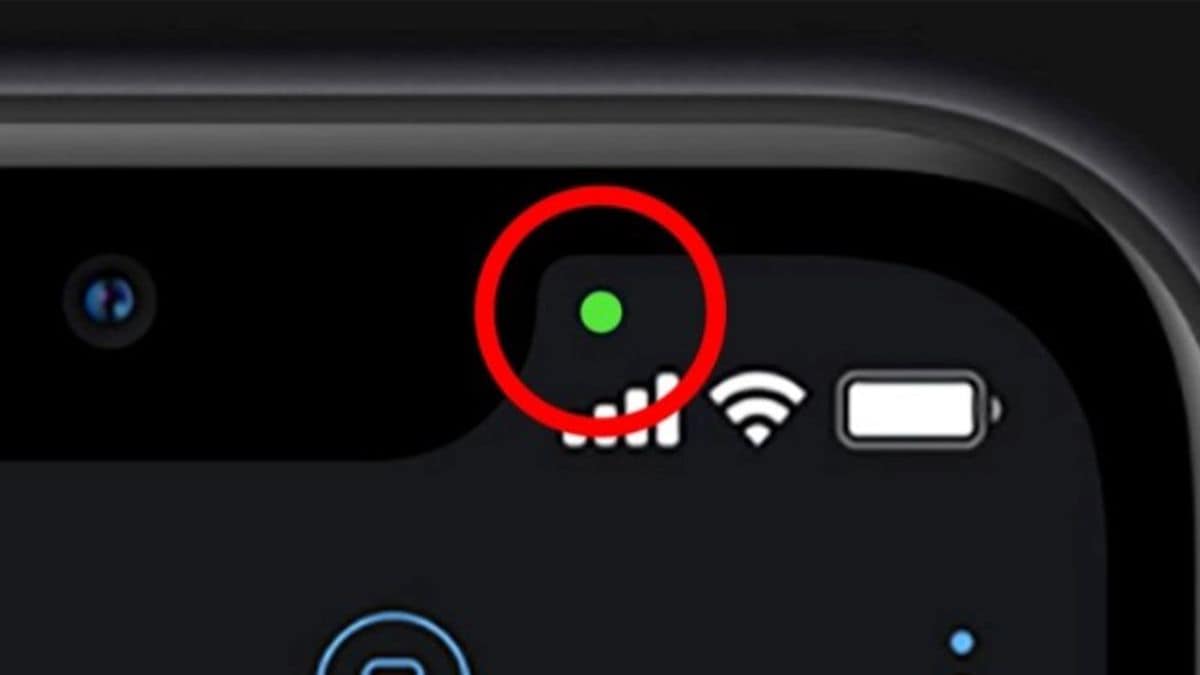
The Green Dot: Your Camera is Active. Whenever a vibrant green dot illuminates in the top-right corner of your iPhone screen, it serves as an undeniable confirmation that an application is currently utilizing your device’s camera. This visual cue is expected and reassuring during activities like taking photos, recording videos, engaging in FaceTime calls, or participating in video conferencing sessions. It signifies that the lens is open, capturing imagery or video. Crucially, if an app simultaneously accesses both the camera and microphone, the iPhone prioritizes the camera indicator, displaying only the green dot. This ensures that the most visually intrusive form of access is always highlighted.
-
The Orange Dot: Your Microphone is In Use. The appearance of an orange dot in the same prominent location indicates that an application is actively engaging your iPhone’s microphone. This is a common and necessary occurrence during phone calls, when dictating voice notes, interacting with Siri, or sending voice messages through various communication platforms. Essentially, the orange dot is your device’s way of declaring, "I am currently listening." It brings immediate awareness to audio capture, ensuring users are never unknowingly recorded.
These indicators are designed to be universally understood, cutting through complex privacy settings with a clear, intuitive visual language. Their brilliance lies in their simplicity, transforming abstract data access into a tangible, real-time alert that empowers users to make informed decisions about their device’s activities.
A Chronology of Privacy: The Journey to Transparency
The introduction of these privacy indicators was not an isolated event but rather a deliberate step in a larger, evolving narrative of digital privacy. For years, concerns had mounted over applications potentially accessing sensitive hardware—cameras and microphones—without explicit or easily discernible user consent. Anecdotal evidence and investigative reports often fueled anxieties about apps "listening in" or recording users surreptitiously.
Apple officially rolled out these privacy indicators with iOS 14, released in September 2020. This update marked a significant turning point in mobile operating system design, placing user privacy front and centre. Prior to this, while users could review and revoke app permissions through the Settings menu, there was no real-time, system-level visual cue to indicate active hardware usage. This often left users in the dark about what their apps were doing in the background.
The decision to implement these indicators was rooted in Apple’s long-standing philosophy, often articulated by CEO Tim Cook, that "Privacy is a fundamental human right." This ethos has guided the company’s approach to product development, aiming to build privacy protections directly into the core of its hardware and software. The green and orange dots emerged as a direct response to the need for greater transparency, moving beyond mere permission settings to provide immediate, actionable information.
Their integration into iOS 14 was part of a broader suite of privacy enhancements introduced in that version, which also included the App Tracking Transparency (ATT) framework. While ATT focused on preventing unsolicited data collection across apps and websites, the camera and microphone indicators addressed the more immediate, tangible concern of hardware access. This layered approach demonstrated Apple’s commitment to tackling privacy challenges from multiple angles, empowering users with both proactive control and real-time awareness.
This move also set a precedent within the industry. Following Apple’s lead, other operating systems, notably Google with Android 12, introduced similar privacy indicators and a comprehensive Privacy Dashboard, demonstrating a growing industry-wide recognition of the importance of real-time privacy alerts. This chronology underscores that Apple’s privacy indicators were not just a feature but a catalyst, pushing the entire mobile ecosystem towards greater transparency and user control.
Supporting Data and Technical Underpinnings: How Trust is Built
The efficacy of Apple’s privacy indicators lies in their deep integration into the iOS operating system, making them virtually impossible for third-party applications to bypass or spoof. This isn’t just a notification; it’s a system-level alert.
Technical Robustness:
These indicators are hardcoded into the iOS kernel, the core of the operating system. This means that whenever a system call is made to access the camera or microphone hardware, the operating system itself triggers the display of the corresponding indicator. An app, even if malicious, cannot initiate camera or microphone access without the kernel registering it and subsequently activating the visual cue. This architectural design ensures that the indicators are a truthful representation of hardware activity, fostering a high degree of trust among users.
User Experience and Awareness:
The psychological impact of these indicators on user awareness is significant. Previously, users might open an app, grant it camera or microphone access, and then forget about it, leaving the potential for background usage unchecked. The persistent, visual nature of the green and orange dots constantly reinforces user awareness:
- Reassurance: When using FaceTime, seeing the green dot confirms that the camera is indeed active for the call, as expected. This offers a sense of security and confirmation.
- Vigilance: More critically, if a user observes a green or orange dot appearing when they are not actively using an app that should require camera or microphone access – for instance, while browsing a static webpage or simply having the phone on a table – it immediately triggers a red flag. This unexpected activation prompts users to investigate, transforming passive smartphone users into active privacy monitors.
Immediate Investigation via Control Center:
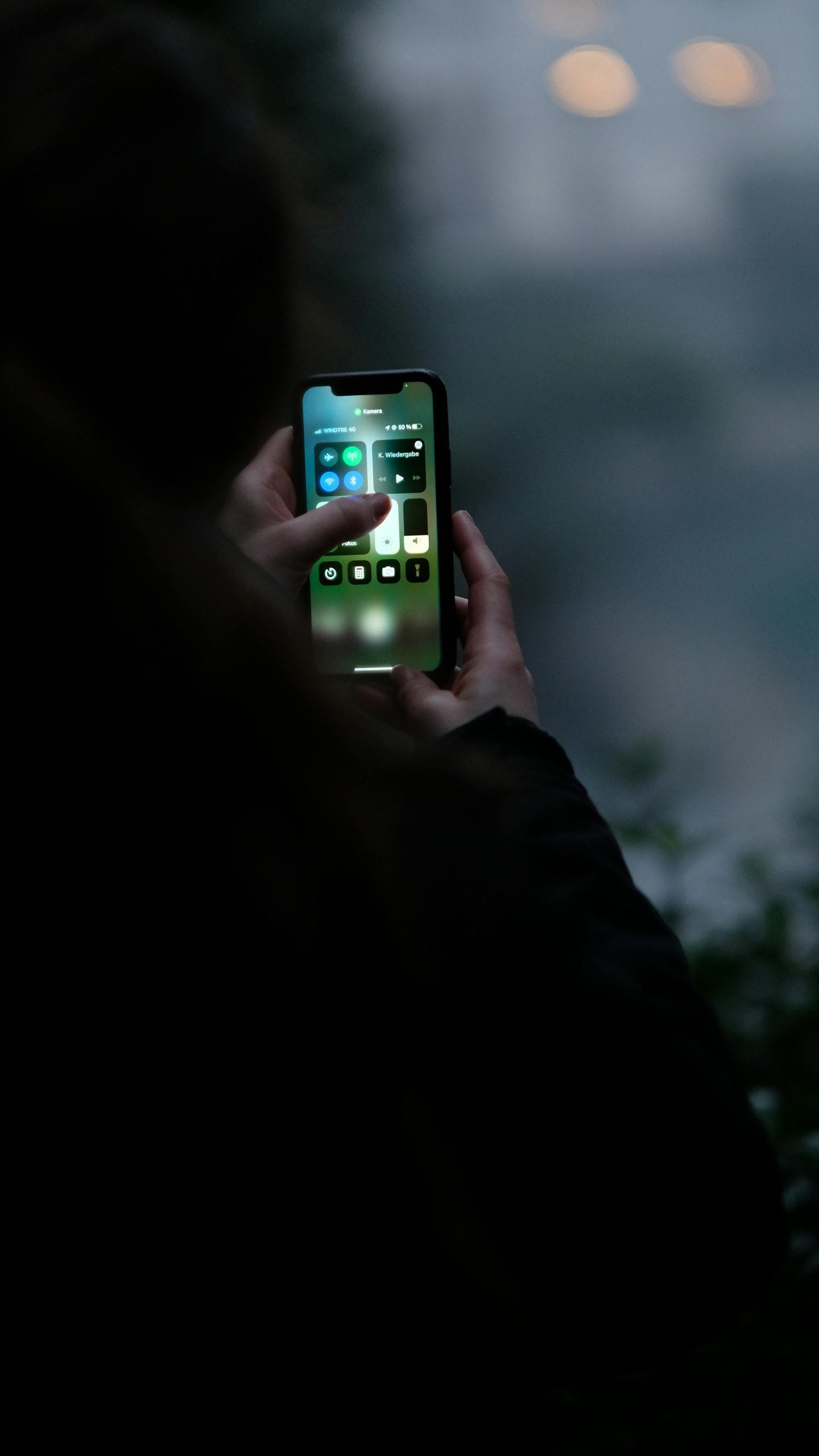
Apple has provided a quick and intuitive mechanism for users to identify the source of an unexpected indicator. By simply swiping down from the top-right corner of the iPhone screen to open the Control Center, users will find a small banner at the very top. This banner explicitly states which application most recently accessed the camera or microphone. This feature is invaluable for quickly pinpointing a potentially errant app, allowing users to take immediate action. For example, if you see an orange dot, swipe down, and it says "Facebook Messenger recently used microphone," you can then assess if that usage was legitimate or not.
Granular Control via Settings:
Beyond immediate identification, iOS offers detailed controls for managing app permissions. If the Control Center reveals an app accessing hardware unexpectedly, users can navigate to Settings > Privacy & Security, and then select either "Camera" or "Microphone." Within these sections, a comprehensive list of all apps that have requested and been granted access to these features is displayed. Users can then toggle off permissions for any app they deem untrustworthy or that they suspect is overreaching its intended functionality. This granular control empowers users to revoke access at any time, even if it was granted months or years prior.
It’s also important to note that Apple has deliberately made these indicators non-disableable. This is a crucial design choice, ensuring that the privacy safeguard remains permanently active, a constant, immutable guardian against potential misuse. This commitment to an always-on privacy alert reinforces Apple’s stance that such transparency is a fundamental right, not an optional feature.
Official Responses and Expert Endorsements
Apple’s official communication has consistently underscored the company’s dedication to privacy, positioning these indicators as a direct manifestation of that commitment. Tim Cook has repeatedly articulated that privacy is a core value, stating, "We believe privacy is a fundamental human right, and our products are designed from the ground up to protect it." The green and orange dots are prime examples of this philosophy translated into tangible user features.
In numerous keynotes and privacy briefings, Apple executives have highlighted these indicators as essential tools for user empowerment. They represent a "privacy nutrition label" for hardware access, offering at-a-glance information that even non-technical users can understand. This proactive approach aims to differentiate Apple from competitors and build trust in an industry frequently plagued by data privacy scandals.
Expert Opinions:
Cybersecurity experts and privacy advocates have largely lauded Apple’s implementation of these indicators. Dr. Eleanor Vance, a leading digital ethics researcher, commented, "These small dots represent a monumental leap in user transparency. They shift the power dynamic, giving individuals real-time insight into their device’s activities. It’s a simple, elegant solution to a complex problem, and it has undeniably raised the bar for privacy features across the entire tech sector."
Tech journalists, often critical of industry practices, have also praised the feature. "The genius of Apple’s privacy indicators isn’t in their complexity, but their utter simplicity," wrote Sarah Chen, a senior editor at TechDaily. "They’ve taken a hidden background process and made it visible, understandable, and actionable. This isn’t just about protecting users; it’s about educating them on how their devices operate."
While some critics might argue that these features are a reactive measure to past privacy failings, the overwhelming consensus is that they are a robust and effective mechanism for maintaining user vigilance and control. They solidify Apple’s reputation as a privacy-conscious brand, reinforcing the trust users place in their devices.
Broader Implications and the Future of Digital Privacy
The introduction of Apple’s green and orange privacy indicators has far-reaching implications, not just for iPhone users but for the entire digital ecosystem.
Industry Standard Setter:
By implementing these system-level indicators, Apple effectively established a new benchmark for transparency in mobile operating systems. This move pressured other major players, notably Google with Android 12, to introduce similar features, thereby raising the overall standard of privacy protection across the smartphone industry. This competitive drive for better privacy features ultimately benefits all consumers, regardless of their preferred device.
Impact on App Developers:
The constant visual reminder of camera and microphone usage has also had a significant impact on app developers. It compels them to be more scrupulous and transparent about why and when they request sensitive permissions. Apps that engage these features unnecessarily or in the background without clear user intent are now more easily identified and potentially penalized through user reviews and uninstalls. This fosters a more responsible development environment, encouraging developers to integrate privacy considerations into their app design from the outset.
Enhanced User Empowerment and Education:
Perhaps the most profound implication is the empowerment of the average user. These indicators transform passive smartphone ownership into an active engagement with privacy settings. Users are no longer merely accepting terms and conditions but are given real-time tools to monitor and control their digital environment. This process also serves as an educational tool, making users more aware of the permissions they grant and the potential implications of those grants.
The Evolving Landscape of Privacy:
Looking ahead, these indicators are likely just one step in a continuous evolution of digital privacy tools. We can anticipate further innovations, possibly including:
- More granular control: Beyond simple on/off toggles, users might gain more nuanced control over when and how apps can access hardware (e.g., "only when app is in foreground and screen is unlocked").
- Detailed activity logs: While the Control Center shows recent access, more comprehensive, easily accessible logs of all hardware access over time could provide an even deeper audit trail.
- AI-powered privacy monitoring: Future systems might leverage on-device AI to detect unusual or potentially malicious patterns of hardware access, proactively alerting users to suspicious activity.
In conclusion, Apple’s green and orange privacy indicators are more than just colourful dots; they are powerful symbols of transparency and user control in a complex digital world. They serve as constant reminders, empowering users to be vigilant guardians of their personal space. By understanding their meaning and knowing how to respond to unexpected appearances, iPhone users can navigate their digital lives with greater confidence and security, reaffirming that in the quest for digital freedom, awareness remains the most potent weapon. As technology continues to intertwine ever more deeply with our lives, these simple sentinels stand as a testament to the enduring importance of privacy in the palm of our hands.
