
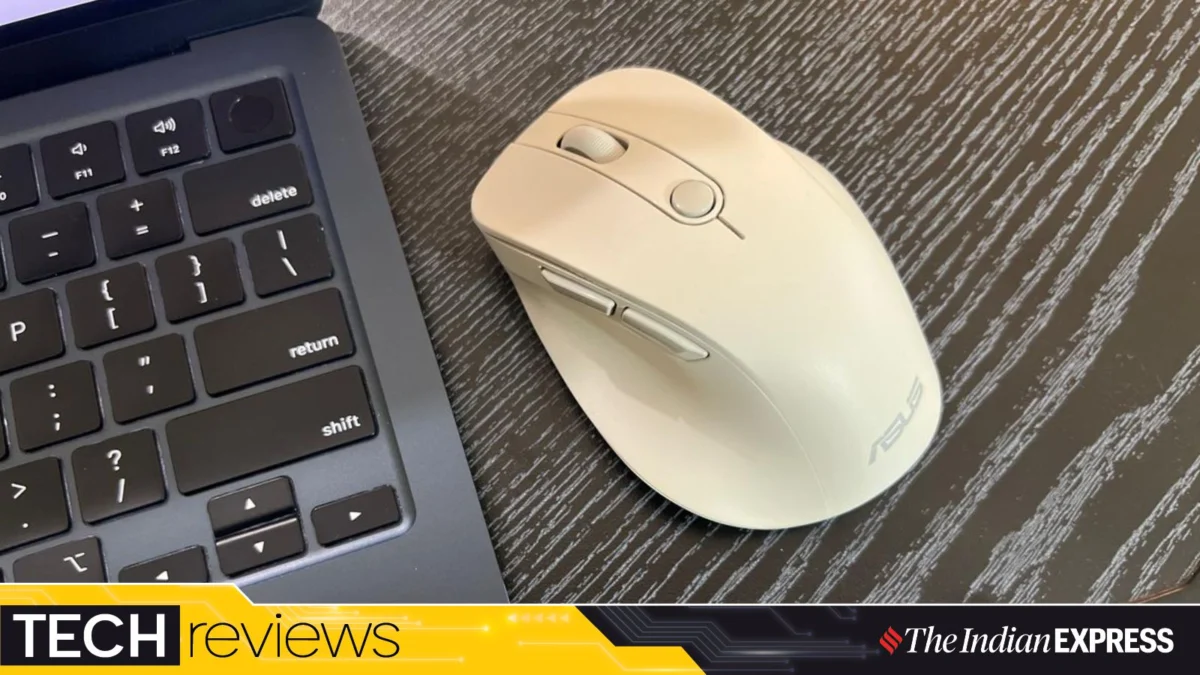
Bijin Jose, Assistant Editor at Indian Express Online, recently put the MD105 through its paces, concluding that its practical features, ergonomic design, and dual-mode connectivity make it a compelling choice for a broad spectrum of users. In a detailed assessment, Jose emphasized that for tasks ranging from extensive writing and web browsing to meticulous document work and seamless application switching, reliability and comfort far outweigh a superfluous array of specifications. The MD105, he notes, delivers precisely on these core tenets, presenting a straightforward yet highly effective solution in a compact form factor.
Unpacking the ASUS MD105: Main Facts at a Glance
The ASUS Wireless Mouse MD105 is designed with a singular purpose: to enhance daily productivity through a blend of ergonomic comfort and versatile connectivity. It is a wireless peripheral engineered for general-purpose computing, eschewing the complexities often associated with specialized mice in favour of a streamlined, user-centric experience.
Key Features:
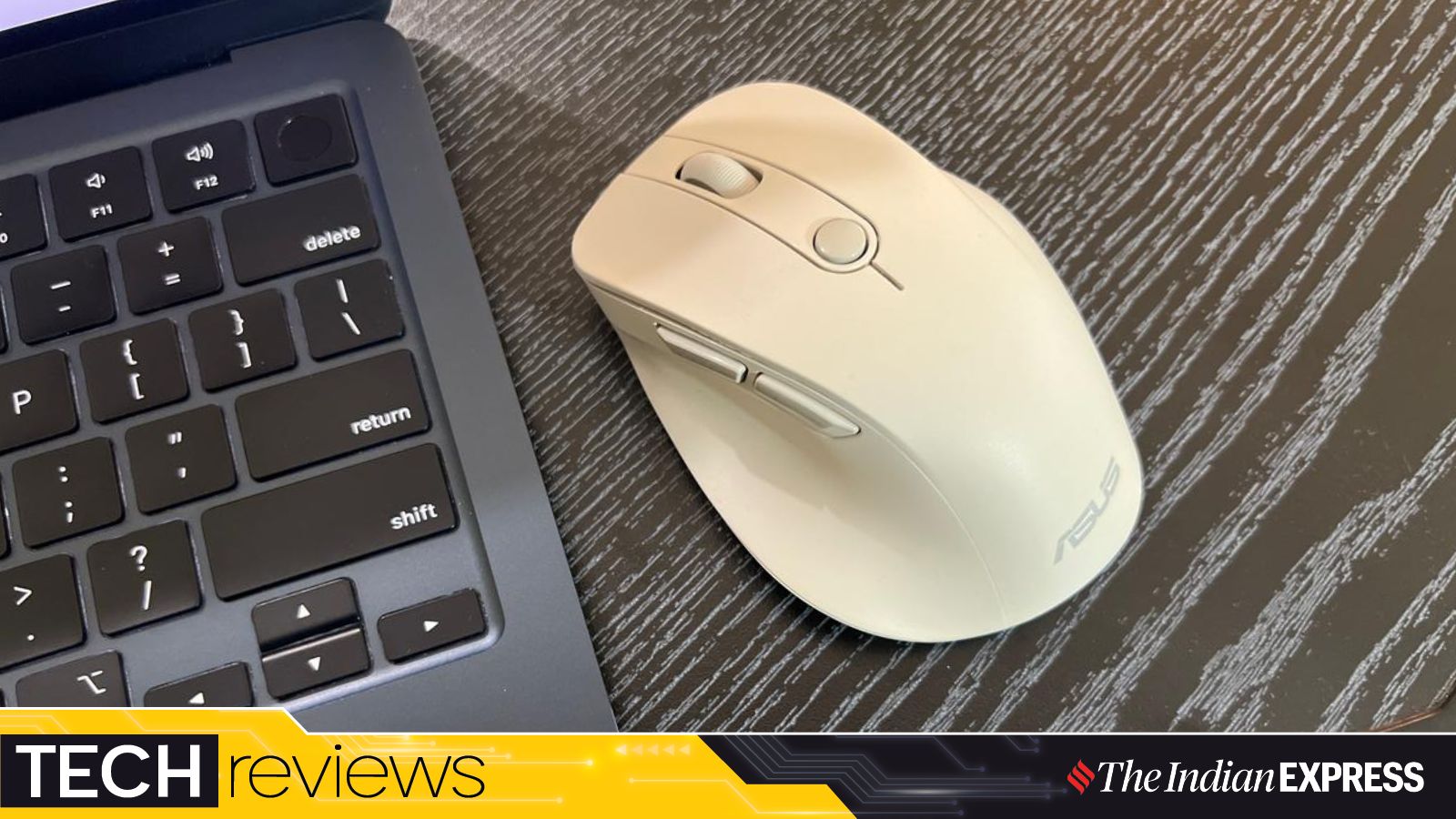
- Ergonomic Design: Features a distinctive thumb rest and sculpted contours for sustained comfort during prolonged use.
- Dual-Mode Connectivity: Offers both 2.4GHz wireless via a dedicated USB dongle and Bluetooth connectivity, providing flexibility across various devices and operating systems.
- Adjustable DPI: Equipped with an optical sensor offering sensitivity levels of 1200, 1600, and 2400 DPI, catering to diverse screen sizes and task requirements.
- Whisper-Quiet Operation: Designed with silent click buttons, ideal for environments where noise reduction is paramount.
- Multi-Device Pairing: Capable of connecting to up to three devices simultaneously, allowing for quick switching between a laptop, desktop, or other compatible gadgets.
- Portable and Lightweight: Weighs a mere 66 grams (without battery) and measures 110 x 72 x 43mm, making it remarkably handy.
- Integrated Dongle Storage: A discreet compartment under the mouse ensures the USB receiver is securely stored, mitigating the risk of loss.
- Power Source: Operates on a single AA battery, conveniently included in the box.
The MD105 is explicitly marketed as a productivity tool, distinguishing itself from the high-performance demands of gaming mice or the ultra-flat profiles of travel-specific alternatives. Its target audience comprises professionals, students, and everyday users who prioritize sustained comfort, dependable performance, and seamless transitions between multiple devices. Jose’s assessment firmly positions the MD105 as an excellent general-purpose wireless mouse, particularly for those seeking productivity accessories to genuinely enhance their workflow.
A Two-Week Deep Dive: The Chronology of an Everyday Tool
The journey with any new peripheral often begins with a mix of anticipation and practical assessment. For Bijin Jose, whose daily regimen heavily involves writing, research, and application management, the criteria for a good mouse are deceptively simple: it must be reliable and comfortable. The ASUS MD105 stepped into this role with an understated confidence, undergoing a rigorous two-week evaluation that meticulously tracked its performance and ergonomic merits.
Initial Impressions and Setup Simplicity:
From the moment it was unboxed, the MD105 presented itself as a no-fuss device. Jose noted with relief that there was "no need for an elaborate setup process." This immediate plug-and-play functionality, whether via the 2.4GHz dongle or Bluetooth pairing, set a positive tone. The first interaction highlighted its remarkably lightweight nature (66 grams without the battery), making it instantly feel nimble and easy to maneuver. The ergonomic contours, particularly the built-in thumb rest, were an immediate point of interest, marking a departure from the flatter, more conventional mice Jose had used previously. This initial tactile experience suggested a device designed with long-term comfort in mind.
Adapting to Ergonomics and Sustained Use:
As the first few days progressed, the ergonomic shape became a defining characteristic. Jose, accustomed to traditional mouse designs, found the MD105’s form factor to be surprisingly adaptive. The thumb rest, a feature often found on higher-end ergonomic mice, proved its worth, cradling the hand in a more natural position and significantly reducing wrist strain during extended work sessions. This period involved continuous use for writing articles, navigating complex web pages, and managing multiple open documents, tasks that demand precision and sustained interaction. The transition between different applications on both a MacBook Air and a Dell laptop became a seamless affair, thanks to the dual-mode connectivity.
Exploring Connectivity and Advanced Features:
Mid-way through the testing period, the true versatility of the MD105’s connectivity became apparent. The ability to effortlessly shift between devices using either Bluetooth or the 2.4GHz dongle proved invaluable. This flexibility eliminated the minor but persistent annoyance of re-pairing or physically moving a dongle between machines, a common friction point for professionals working across multiple platforms. The discovery of the small, secure compartment for the USB dongle underneath the mouse was a notable highlight, addressing a common frustration for users prone to misplacing these tiny, yet crucial, components. This thoughtful design detail underscored ASUS’s understanding of practical user needs.
The adjustable DPI settings also came into play, allowing Jose to fine-tune sensitivity based on the specific task at hand or the size of the monitor being used. The experience with the "quieter operation" was particularly appreciated, especially in environments where concentration is paramount. The subtle clicks, almost imperceptible, contributed to a more focused and less disruptive workspace. The two additional side buttons, while not explicitly customized by Jose in the review, offered an implicit promise of enhanced control and potential for macro assignments, adding another layer of utility.
Final Assessment and Long-Term Viability:
By the end of the two weeks, the MD105 had not only met but exceeded expectations for a productivity mouse. Its reliability was unwavering, its comfort sustained, and its features proved genuinely useful rather than merely decorative. The chronological usage demonstrated that the MD105 is more than just a peripheral; it’s an enabler of efficient workflow, a silent partner in productivity. Jose’s conclusion that the "experience has been satisfying" is a testament to the MD105’s consistent performance and thoughtful design over an extended period of practical application.
Dissecting the Engineering: Supporting Data and Design Philosophy
Beyond the user experience, the efficacy of the ASUS MD105 lies in its underlying design principles and technical specifications. A closer examination of these elements reveals why it stands out as a robust choice for daily productivity.
Ergonomics: The Science of Comfort
The MD105’s ergonomic design is arguably its most significant asset. Measuring 110 x 72 x 43mm and weighing 66 grams (without battery), it strikes a balance between being substantial enough to fill the palm comfortably and light enough for effortless movement. The inclusion of a built-in thumb rest is a critical differentiator. Unlike flat, symmetrical mice that force the hand into an unnatural, pronated position, the MD105’s sculpted form gently supports the hand’s natural curve, reducing the strain on the wrist and forearm.
Scientific studies on ergonomics consistently demonstrate that properly designed peripherals can mitigate the risk of Repetitive Strain Injuries (RSIs) such as carpal tunnel syndrome. By allowing the hand and wrist to maintain a more neutral posture, the MD105 minimizes pressure points and muscular tension. This design philosophy directly caters to users who spend hours daily interacting with their computers, offering a tangible benefit in terms of long-term health and comfort. Jose’s observation that "this is the first time I am working on a mouse of this shape, and I feel it is more suited to users who lean towards a conventional ergonomic mouse instead of the flat and compact travel mice" underscores this distinction. It’s a deliberate choice for sustained comfort over ultimate portability, a trade-off many productivity users are willing to make.
Dual-Mode Connectivity: Bridging the Digital Divide
In a multi-device ecosystem, versatile connectivity is paramount. The MD105’s dual-mode capability — supporting both 2.4GHz wireless via a USB dongle and Bluetooth — offers unparalleled flexibility.
- 2.4GHz Wireless: This mode provides a robust, low-latency connection, often preferred for its stability and minimal interference. It’s ideal for desktops or laptops where a USB port is readily available and maximum responsiveness is desired. The included dongle is pre-paired, ensuring immediate functionality without complex setup. The 10-meter wireless range further enhances freedom of movement.
- Bluetooth Connectivity: Crucial for modern ultrabooks, tablets, or devices that lack traditional USB-A ports or where preserving them for other peripherals is a priority. Bluetooth offers the convenience of a cable-free and dongle-free setup, making it perfect for mobile professionals or those with minimalist desk setups.
The ability to connect up to three devices and switch between them seamlessly (presumably via a button on the mouse) is a game-changer for professionals who frequently transition between a primary desktop, a work laptop, and perhaps a personal tablet. This feature streamlines workflow, eliminating the need for multiple mice or constant re-pairing, thereby boosting efficiency. The secure dongle storage compartment is a small but significant detail that prevents loss, a common frustration for wireless mouse users.
Performance and Precision: Tailored for Productivity
The optical sensor in the MD105 offers adjustable DPI (Dots Per Inch) settings of 1200, 1600, and 2400. This range is perfectly calibrated for general productivity tasks:
- 1200 DPI: Suitable for precise work on standard-sized monitors, offering deliberate and controlled cursor movement.
- 1600 DPI: A versatile middle-ground, ideal for everyday browsing, document editing, and navigating across dual monitors.
- 2400 DPI: Provides faster cursor movement, beneficial for large, high-resolution displays or when needing to cover extensive screen real estate quickly.
This flexibility ensures that users can optimize cursor speed and accuracy to match their specific tasks and monitor setups, preventing the frustration of an overly slow or hyper-sensitive cursor.
Perhaps one of the most understated yet impactful features is the "quieter operation." In open-plan offices, shared workspaces, libraries, or even quiet home offices, the incessant clicking of a traditional mouse can be a significant distraction. The MD105’s silent click technology drastically reduces this auditory footprint, contributing to a more focused and peaceful work environment for both the user and those around them. This feature aligns perfectly with the evolving demands of hybrid work models, where quiet operation can significantly improve concentration and reduce digital fatigue.
The inclusion of two additional side buttons offers an extra layer of control. While the review doesn’t detail their programmability, in many productivity mice, these buttons can be assigned to common functions like "back" and "forward" in web browsers, or custom macros for specific applications, further enhancing workflow efficiency without overcomplicating the design.
Power Management and Durability
The MD105 is powered by a single AA battery, which is included in the box. While specific battery life claims are often dependent on usage patterns (e.g., 2.4GHz typically consumes more power than Bluetooth), productivity mice of this caliber often boast several months to a year of battery life under typical conditions. This long endurance minimizes the hassle of frequent battery changes. The emphasis on a single, readily available AA battery also adds to its practicality, making replacements simple and inexpensive.
In essence, the supporting data reveals that the ASUS MD105 is not a product of chance but a result of deliberate design choices, each aimed at optimizing the user’s productivity and comfort.
ASUS’s Vision: Official Responses and Product Philosophy
While the original article doesn’t contain direct quotes from ASUS officials, the product’s design and features inherently communicate the company’s official stance and market philosophy regarding the MD105. This mouse is a clear manifestation of ASUS’s commitment to providing reliable, user-centric peripherals that cater to the practical demands of the modern workforce.
Positioning as a Productivity Catalyst:
ASUS explicitly positions the MD105 as a "productivity mouse," a strategic designation that defines its intended use and target demographic. This isn’t a device designed to break speed records in competitive gaming or to offer an ultra-minimalist aesthetic for the occasional traveler. Instead, it’s crafted for the daily grind – the extensive hours spent on documentation, browsing, and application management. This positioning reflects ASUS’s understanding that a significant segment of the market prioritizes functionality, comfort, and dependability over niche, high-performance features.
Emphasis on User Experience (UX):
The design choices embedded in the MD105 — particularly the ergonomic shape with a thumb rest, dual-mode connectivity, and quiet operation — collectively underscore ASUS’s focus on user experience. These aren’t merely features; they are solutions to common pain points experienced by everyday computer users:
- Comfort: Addressing the physical strain of prolonged mouse use, indicating a commitment to user well-being.
- Flexibility: Providing seamless transitions across devices, acknowledging the multi-platform reality of modern work.
- Environment: Minimizing noise, recognizing the importance of a focused and non-disruptive workspace.
By integrating these elements, ASUS communicates its dedication to crafting peripherals that not only perform well but also enhance the overall quality of the user’s digital interaction. The inclusion of thoughtful details, such as the integrated dongle compartment, further solidifies this user-first approach, demonstrating an understanding of practical, real-world usage scenarios.
Reliability and Accessibility:
The choice of an optical sensor with adjustable DPI, combined with a simple AA battery power source, speaks to ASUS’s desire for the MD105 to be broadly accessible and consistently reliable. It avoids proprietary charging solutions or overly complex software, opting instead for straightforward functionality that requires minimal setup and maintenance. This approach ensures that the MD105 is a dependable tool, reducing friction and maximizing uptime for the end-user. The claim of multi-device connectivity (up to three devices) is a testament to ASUS’s vision of creating versatile tools that adapt to the user’s dynamic workflow, rather than forcing the user to adapt to the tool.
In essence, the ASUS MD105 embodies the company’s official response to the evolving needs of the productivity segment: a commitment to ergonomic comfort, versatile connectivity, quiet efficiency, and unwavering reliability, all packaged in an accessible and user-friendly design.
Beyond the Click: Implications for Users, Workplaces, and the Market
The introduction and positive reception of the ASUS Wireless Mouse MD105 carry significant implications, extending beyond the individual user to influence workplace dynamics and broader market trends in peripheral design.
Implications for the Individual User: Enhanced Well-being and Workflow
For the individual, the MD105 represents a tangible upgrade in the daily computing experience. The most immediate benefit is the reduction in physical strain. The ergonomic design, particularly the thumb rest, can significantly alleviate discomfort associated with prolonged mouse use, potentially mitigating the onset of RSIs. This translates to greater comfort, improved focus, and sustained productivity throughout the workday. When a user is not constantly adjusting their grip or experiencing wrist pain, their cognitive resources are freed up to concentrate on the task at hand.
Furthermore, the seamless multi-device workflow enabled by dual-mode connectivity means less friction in transitioning between tasks or platforms. Professionals who juggle a desktop for heavy lifting, a laptop for meetings, and perhaps a tablet for quick reviews can maintain a consistent input experience without the hassle of re-pairing or carrying multiple mice. This efficiency gain, while seemingly minor, accumulates over time to contribute to a more fluid and less frustrating digital experience. The quiet clicks also contribute to a less stressful personal workspace, allowing for deeper concentration.
Implications for the Workplace: Fostering Productivity and Harmony
In modern workplaces, especially those embracing hybrid models, open-plan offices, or hot-desking, the MD105 offers distinct advantages:
- Reduced Noise Pollution: The quieter operation is a boon for shared environments. It minimizes auditory distractions, allowing employees to maintain focus and reducing the overall noise footprint in an office, library, or co-working space. This contributes to a more harmonious and productive atmosphere for everyone.
- Flexibility for Hybrid Work: For organizations supporting remote or hybrid work, providing employees with peripherals like the MD105 ensures consistency in their setup, whether at home or in the office. Its multi-device capability makes it ideal for employees who might use a work-issued laptop at home and a desktop in the office.
- Employee Well-being Programs: Companies increasingly invest in ergonomic equipment to support employee health. The MD105, with its comfort-focused design, fits well into such initiatives, demonstrating a commitment to employee well-being and potentially reducing health-related absenteeism.
Implications for the Peripheral Market: A Focus on Core Competencies
The success of the MD105 also sends a clear signal to the peripheral market: there is a strong demand for products that excel at core functionalities rather than relying on an exhaustive list of niche features. In a market often saturated with gaming-centric or overly complex devices, the MD105 champions simplicity, reliability, and thoughtful ergonomics.
- Prioritizing Ergonomics: Its design reinforces the growing trend towards ergonomic peripherals as a standard expectation rather than a premium add-on. This could encourage other manufacturers to invest more heavily in comfort-focused designs across their product lines.
- Dual-Mode as a Standard: The MD105 solidifies dual-mode connectivity as a baseline expectation for productivity mice, reflecting the ubiquitous presence of both traditional and modern computing devices.
- Value Proposition: By offering a compelling combination of features at what is likely an accessible price point (implied by its "general-purpose" positioning), the MD105 sets a strong value benchmark for productivity peripherals. It demonstrates that advanced features like multi-device switching and ergonomic comfort don’t necessarily have to come with a premium price tag.
In conclusion, the ASUS Wireless Mouse MD105 is more than just a peripheral; it’s a reflection of evolving user needs and a testament to the enduring value of well-engineered simplicity. For Bijin Jose, it proved to be an indispensable tool that seamlessly integrated into his demanding workflow. For the broader market, it underscores the importance of focusing on what truly matters: comfort, reliability, and versatile functionality that genuinely enhances daily productivity. It works best as a general-purpose wireless mouse, especially for those who are looking for productivity accessories to enhance their work, embodying the philosophy that sometimes, less is indeed more, especially when that "less" is executed with precision and user-centric insight.